Book Mockup 8x10 KDP A+ PNG Templates: Elevate Your Designs
When you are deep in the creative process of designing a journal, planner, or novel, the journey from the digital canvas to a tangible product can feel abstract. You have the design, but how do you show your audience exactly what they are getting? This is where the right presentation tool changes everything. The Book Mockup 8x10 KDP A+ PNG Templates offer a straightforward, powerful solution for anyone looking to create professional presentations without the steep learning curve of advanced graphic design software. It is a resource built for clarity and impact, allowing your work to speak for itself.
Understanding the Visual Appeal and Practicality
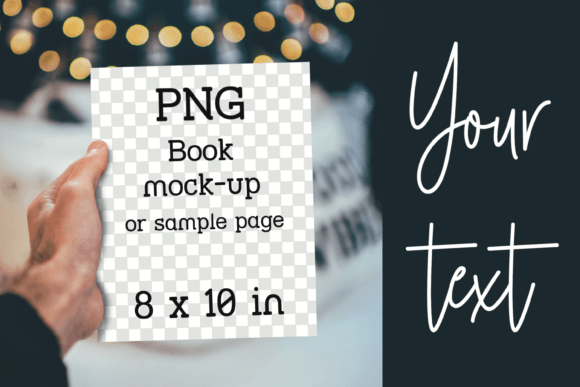
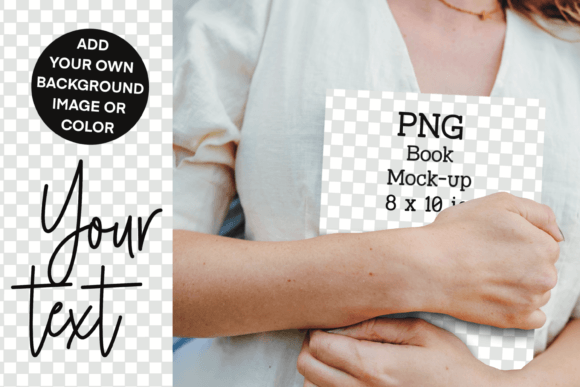
This particular mockup is designed with a specific purpose: to provide a clean, adaptable frame for your 8x10 inch book covers. Its visual personality is one of subtle professionalism. The mockup itself is a transparent PNG, meaning it is essentially a high-quality digital stencil. The area where your book cover will appear is transparent, as is the background space. This design choice is its greatest strength. It does not impose a fixed scene or mood; instead, it acts as a versatile stage, ready to be customized to match the unique aesthetic of your project.
The overall appeal lies in its simplicity and directness. There are no complicated layers or smart objects to navigate. You are not locked into a specific background color or texture. This makes the Book Mockup 8x10 KDP A+ PNG Templates incredibly adaptable for a wide range of styles, from the minimalist cover of a modern planner to the vibrant artwork of a children's coloring book. The focus remains entirely on your design, framed by a realistic book shape that adds depth and context.
Where This Template Truly Shines: Real-World Applications
The value of a good mockup is measured by how effectively it communicates your product's worth to a potential customer. This template excels across multiple platforms, making it a core part of your marketing and presentation toolkit.
For authors and publishers using Kindle Direct Publishing, creating A+ Content is no longer optional for standing out. This mockup is perfectly sized for that purpose. Placing your cover design within the frame, then adding a few sample interior pages on top, creates a compelling visual story that can significantly boost conversion rates on your Amazon listing. It moves your presentation from a flat cover image to a three-dimensional product preview.
Beyond KDP, its applications are extensive. If you run an online shop on Etsy or Shopify, using consistent, high-quality mockups builds brand identity and professionalism. Your product listings will look cohesive and trustworthy. For bloggers and content creators, these mockups are ideal for creating featured images, promotional graphics for new launches, or visual guides in tutorials about self-publishing or design. On social media, a well-composed mockup image stops the scroll far more effectively than a simple cover file. It shows your book in a context that feels real and desirable.
Integrating the Mockup into Your Design Workflow
One of the most significant advantages of this asset is its ease of use. The process is intuitive, even for those with basic editing skills in programs like Canva, Photoshop, or even some mobile apps. The guide is simple: you start with your canvas, place your cover, overlay the mockup, and adjust. This streamlined workflow respects your time and lets you focus on the creative aspects of your project.
When using the Book Mockup 8x10 KDP A+ PNG Templates, think about the context you are creating. The transparent background is your canvas. Choose a background color or image that complements your book cover's palette. If your cover uses bold, modern typography, a clean, solid color background can make it pop. For a whimsical children's activity book, a subtle texture or a scene-setting background can enhance the story. You can also place sample pages from your interior design behind the mockup frame to give a glimpse of the content quality.
This is where you can experiment with font pairings visually. If your book cover uses a strong display font for the title, you can add a subtitle or promotional text using a complementary sans-serif or serif font directly onto your canvas, ensuring it aligns with your overall brand identity. The mockup provides the anchor, and your additional design elements build the narrative.
Practical Tips for Maximum Impact
- Consistency is Key: Use the same style of mockup across all your marketing materials for a specific book. This builds recognition and a professional brand image.
- Test Your Cover: Before finalizing your cover design, drop it into the mockup. Seeing it in a simulated 3D perspective can reveal issues with composition, text placement, or color contrast that are not obvious on a flat file.
- Layer with Purpose: Don't just place the mockup and stop. Add elements that tell a story: a coffee cup, reading glasses, a plant, or even a hand holding a pen. These small touches create a lifestyle image that connects emotionally with your audience.
- Respect the License: Remember this is a digital product for your use. Ensure you understand the terms for commercial use if you are creating assets for clients or selling your own products.
Ultimately, the Book Mockup 8x10 KDP A+ PNG Templates serve as a bridge between your creative vision and your audience's understanding. It transforms a digital file into a tangible product preview, enhancing perceived value and professionalism. By integrating this simple yet effective tool into your workflow, you empower yourself to market your journals, notebooks, novels, and planners with confidence and clarity, letting the quality of your design work take center stage.